Transform your org with innovative, secure, cloud-native AI solutions today.. CONTACT US
Master the HTML form action for enterprise apps in India. Learn to embed HTML scripts, generate HTML diagrams, and use Figma plugins for seamless UI workflows.
Founder
July 20, 2026
At Universal Equations, our "correct-by-design" methodology treats every web interface as a rigorous structural blueprint. This guide explores the complete frontend data lifecycle: defining your html form action, embedding the right html script, mapping your DOM via an html diagram, and seamlessly transitioning from code to canvas using html to figma workflows.
A form HTML element is the fundamental bridge between human interaction and backend data processing. For enterprise teams in IT hubs across Maharashtra, like Pune and Mumbai, mastering how to properly route user input is critical.
HTML form tag kaise use karein? (How to use the HTML form tag?) The <form> tag acts as a container for interactive controls like text fields, dropdowns, and checkboxes, capturing data to be evaluated and sent to a server.
The form action in html is a required attribute that dictates the destination of the submitted data. When a user clicks the submit button, the browser gathers all the input values and routes them to the URL specified inside the action attribute.
Form action kya kaam karta hai? (What does form action do?) Simply put, it acts as the delivery address for your payload. Udaharan ke liye (For example), sending user login credentials securely to an authentication API requires a precisely defined action attribute.
Absolute vs. Relative URLs in Form Actions When defining your html form action, you can use either absolute or relative URLs:
Absolute URL: Points to an entirely different domain or an external API (e.g., <form action="[https://api.example.com/v1/login](https://api.example.com/v1/login)" method="POST">).
Relative URL: Points to a script or route within the same application (e.g., <form action="/api/submit" method="POST">).
Yeh tariqa (This method) of decoupling the frontend form from the backend processor perfectly aligns with headless, composable digital experience platforms (DXP).
Modern headless architectures often intercept the default browser behavior. By understanding JavaScript form submission. , you can send your payload to a serverless function without triggering a full page reload. Try the interactive example below:
function InteractiveForm() {
  const handleSubmit = (e) => {
    e.preventDefault();
    alert("Form intercepted! In a modern React/Next.js app, we send this to a serverless function.");
  };

  return (
    <form action="/api/form-handler" method="POST" onSubmit={handleSubmit} className="p-4 border border-gray-300 rounded">
      <h3 className="text-primary-dark font-bold mb-2">Universal Equations Test Form</h3>
      <input type="email" name="email" placeholder="Enter your email" className="border p-2 mr-2" required />
      <button type="submit" className="bg-primary text-white p-2 rounded">Submit</button>
    </form>
  );
}
Working in tandem with the action attribute is the method attribute. When using the POST method to transmit sensitive data, it is crucial to understand how the browser encodes the payload, typically utilizing the application/x-www-form-urlencoded MIME type.
While the form action handles routing, dynamic validation and asynchronous submission require JavaScript. This is where the html script tag comes into play.
The <script> HTML element is used to embed executable code or data. It allows you to intercept the default browser submission using e.preventDefault(). By placing an html script at the end of your <body> or using the defer attribute in the <head>, you can send your form payload to a serverless Next.js API route without triggering a jarring, full-page reload.
<!-- Example of intercepting a form action via an HTML script -->
<form id="ue-contact-form" action="/api/contact" method="POST">
  <input type="email" name="email" required />
  <button type="submit">Submit</button>
</form>

<script>
  document.getElementById('ue-contact-form').addEventListener('submit', async (e) => {
    e.preventDefault();
    // Logic to handle async submission goes here
    alert('Form intercepted safely!');
  });
</script>Instead of writing custom backend scripts for every form, modern architectures leverage API integrations. Services like Formspree allow you to point your form action in html directly to their endpoint.
Yeh tariqa (This method) offloads spam filtering, email routing, and webhook triggers, perfectly aligning with headless, composable digital experience platforms (DXP).
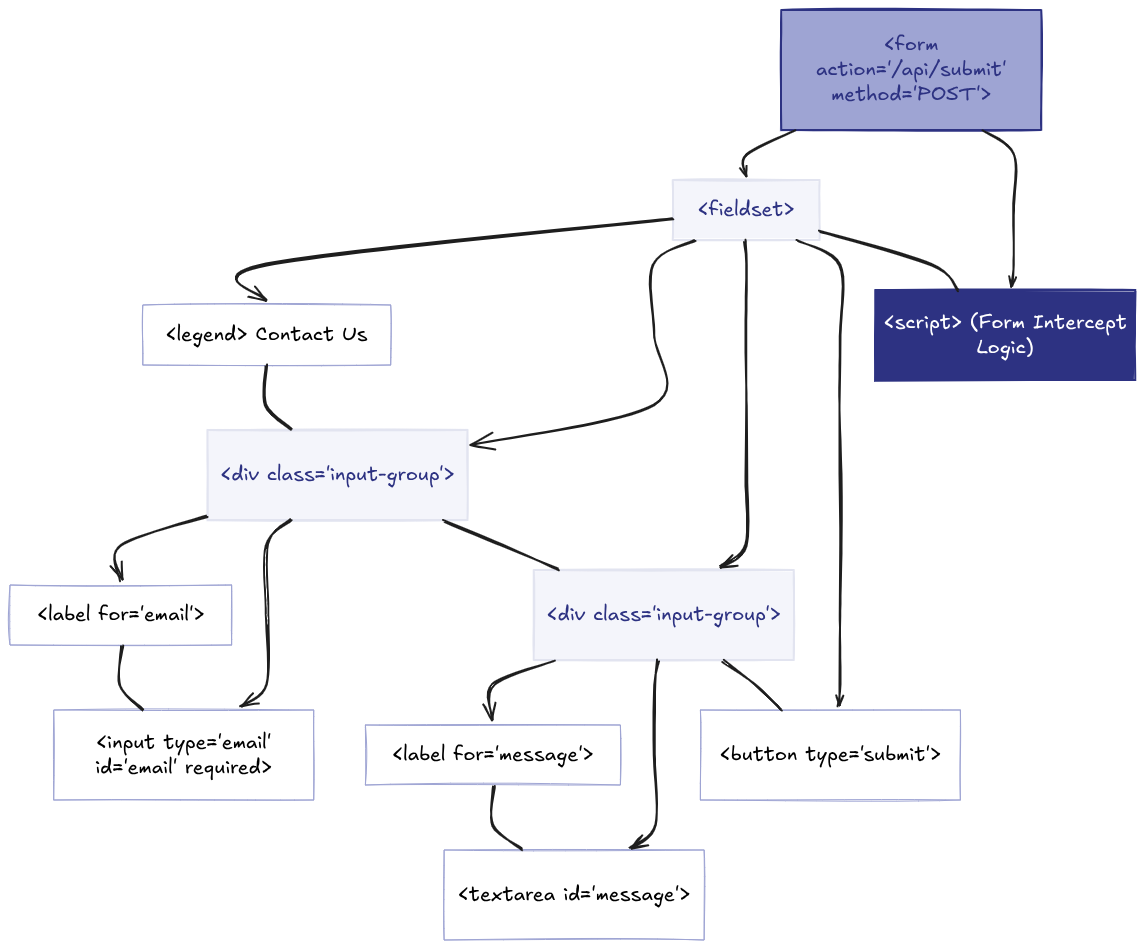
Before writing complex markup or reverse-engineering legacy interfaces from html to figma, enterprise architects rely on operational visibility. You cannot scale what you cannot see. Creating an html diagram provides a clear, visual blueprint of your webpage's structural layout and parent-child relationships.
The html diagram below illustrates the strict hierarchical DOM tree of a modern enterprise web form.
Key Architectural Takeaways:
The Root Node: Everything stems from the parent <form> tag, which holds our critical html form action and method attributes. This is the command center for data routing.
Semantic Wrappers: Notice how the inputs are not left floating. They are grouped logically inside <fieldset> and <div> wrappers, ensuring the form complies with strict WCAG accessibility standards required for government and enterprise sites.
The Logic Layer: At the bottom of the hierarchy sits an isolated html script node. This represents the JavaScript execution layer that intercepts the default browser submission, preventing a page reload and enabling a seamless, headless API integration.
By mapping out your frontend architecture visually, your engineering and UX teams in Pune and Mumbai can align perfectly on data requirements before a single line of code is written or a single Figma component is drawn.
What happens when you need to update a legacy form, but the original design files are lost? In the modern UX/UI ecosystem, the bridge between code and design goes both ways.
Converting html to figma allows developers and designers to import live, browser-rendered web pages directly into Figma as fully editable design layers. Instead of taking flat, useless screenshots, you can utilize powerful plugins to reconstruct the DOM visually:
html.to.design (by ‹div›RIOTS): The industry standard Chrome extension and Figma plugin. It converts any URL or raw HTML code into clean, editable Figma auto-layout frames.
Builder.io & Codia AI: These plugins excel at preserving visible CSS layouts and responsive structures, ensuring your imported forms and inputs are ready for immediate visual collaboration.
By integrating html to figma tools, engineering teams in Maharashtra can radically reduce technical debt, allowing UX designers to visually audit existing form structures and prototype new features seamlessly.