Transform your org with innovative, secure, cloud-native AI solutions today.. CONTACT US
Founder
June 8, 2026
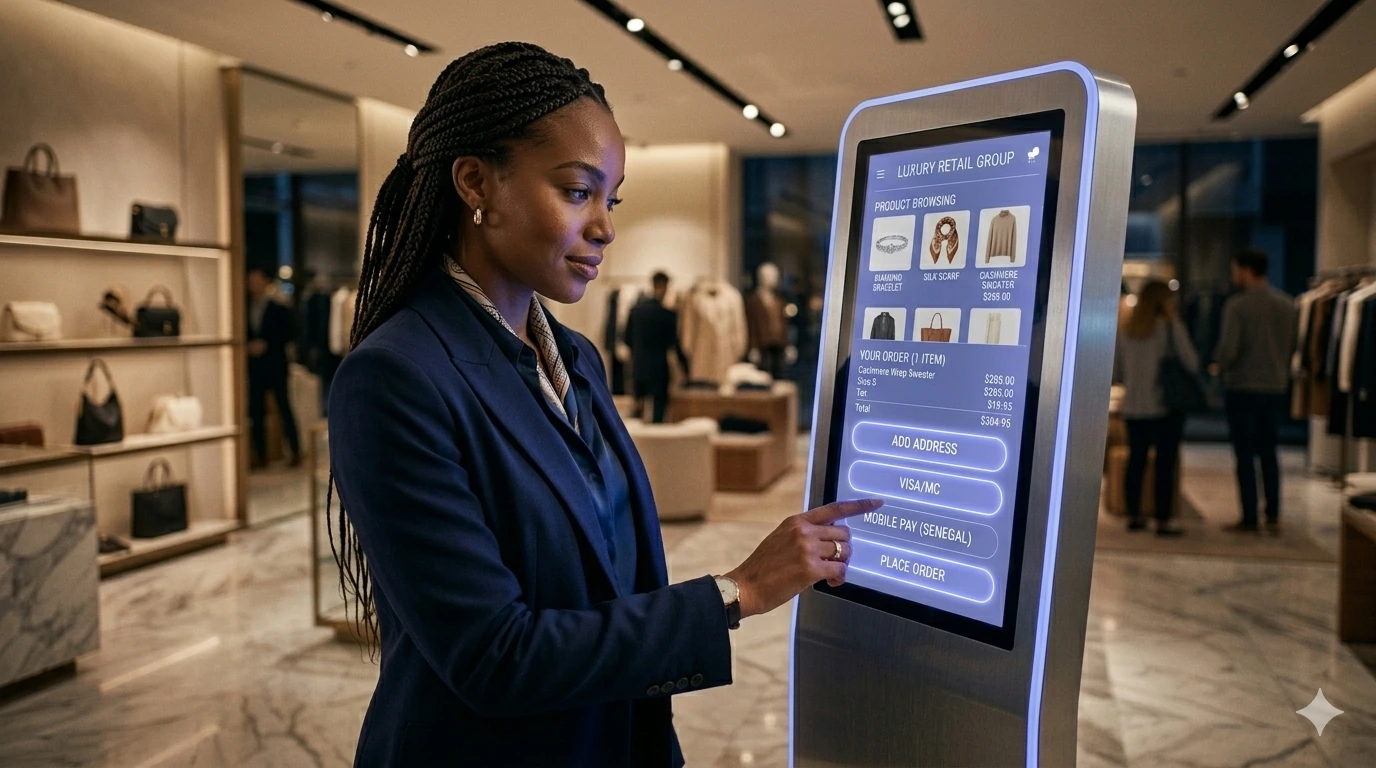
A touch screen kiosk is a standalone, interactive display that allows users to access information, place orders, and complete transactions through a digital interface. These systems combine durable hardware with advanced software, enabling seamless self-service experiences across retail, healthcare, and public environments.
A touch screen kiosk is a self-service interactive terminal that allows users to browse information, place orders, and complete transactions using a digital display. These systems combine high-brightness touch screens, durable enclosures, and cloud-connected software to deliver seamless digital experiences.
While often referred to as “digital kiosks,” modern touch screen kiosks are far more than standalone machines—they are fully connected systems powered by APIs, cloud infrastructure, and real-time data pipelines.
Modern touch screen kiosks operate as end-to-end systems consisting of:
Display layer: Multi-touch, high-resolution (often 4K) screens
Hardware layer: Industrial enclosures, embedded compute units
Software layer: Custom UI applications (React / Next.js)
Backend layer: APIs, microservices, and cloud infrastructure
User interactions on the kiosk trigger API calls, enabling real-time updates such as inventory checks, payments, navigation, or personalized content delivery.
Ideal for retail stores, airports, malls, and high-traffic environments.
Space-efficient solutions used in hospitals, offices, and check-in areas.
Weatherproof, high-brightness systems designed for smart cities and public infrastructure.
Lightweight and cost-effective systems used by small businesses and quick-service environments.
Enterprise-grade kiosks typically include:
Multi-touch displays with anti-glare coatings
High-brightness screens for visibility in all lighting conditions
Industrial-grade enclosures (steel or aluminum)
Embedded computing devices or edge processors
Network connectivity (Wi-Fi, Ethernet, LTE/5G)
These features enable reliable performance in demanding environments while ensuring a smooth user experience.
Touch screen kiosk pricing varies based on hardware, display quality, and software requirements.
Typical Cost Ranges
Entry-level kiosks: $1,500 – $3,000
Mid-range commercial kiosks: $3,000 – $6,000
Enterprise-grade kiosks: $6,000 – $10,000+
Additional Costs
Custom software development
Cloud infrastructure and hosting
Maintenance and monitoring
Analytics and data integration
For businesses, the real ROI comes from automation, increased efficiency, and improved customer experience—not just hardware.
| Feature | Touch Screen Kiosk | Digital Signage |
|---|---|---|
| User Interaction | Yes | No |
| Purpose | Self-service & transactions | Awareness |
| Backend Integration | API-driven | Limited |
| ROI | Operational + transactional | Awareness |
Touch screen kiosks are interactive and generate measurable business value, while digital signage is primarily used for passive communication.
In dense, high-traffic environments like NYC, digital touch screen kiosks generate measurable ROI by reducing operational friction and increasing customer engagement.
Navigation and mapping
Transit schedules and alerts
Emergency communication systems
function SmartCityKiosk() {
  const [activeTab, setActiveTab] = React.useState('transit');

  // Simulated API Data for the Kiosk
  const transitTimes = [
    { line: 'A', dest: 'Inwood-207 St', min: '2 min', color: 'bg-blue-600' },
    { line: 'C', dest: '168 St', min: '5 min', color: 'bg-blue-600' },
    { line: 'E', dest: 'Jamaica Center', min: '8 min', color: 'bg-blue-600' },
  ];

  return (
    <div className="bg-gray-900 rounded-xl overflow-hidden shadow-2xl max-w-sm mx-auto border-4 border-gray-800 h-[450px] flex flex-col font-sans">
      {/* Kiosk Header */}
      <div className="bg-[#2D3282] p-4 text-white flex justify-between items-center shadow-md">
        <div>
          <h2 className="font-bold text-lg leading-tight">NYC Metro Hub</h2>
          <p className="text-xs text-blue-200">Terminal 4 • Kiosk ID: UE-804</p>
        </div>
        <div className="text-right">
          <p className="text-sm font-semibold">{new Date().toLocaleTimeString([], {hour: '2-digit', minute:'2-digit'})}</p>
          <p className="text-[10px] text-blue-200">68°F • Cloudy</p>
        </div>
      </div>

      {/* Navigation Tabs */}
      <div className="flex bg-gray-800 text-sm">
        <button
          onClick={() => setActiveTab('transit')}
          className={`flex-1 py-3 text-center transition-colors ${activeTab === 'transit' ? 'bg-gray-700 text-white font-bold border-b-2 border-[#9EA4D3]' : 'text-gray-400 hover:text-white'}`}
        >
          Transit
        </button>
        <button
          onClick={() => setActiveTab('map')}
          className={`flex-1 py-3 text-center transition-colors ${activeTab === 'map' ? 'bg-gray-700 text-white font-bold border-b-2 border-[#9EA4D3]' : 'text-gray-400 hover:text-white'}`}
        >
          Wayfinding
        </button>
      </div>

      {/* Dynamic Content Area */}
      <div className="flex-1 bg-gray-100 p-4 overflow-y-auto">
        {activeTab === 'transit' ? (
          <div className="space-y-3">
            <h3 className="font-bold text-gray-800 text-sm uppercase tracking-wider mb-2">Live Departures</h3>
            {transitTimes.map((train, i) => (
              <div key={i} className="bg-white p-3 rounded-lg shadow-sm flex items-center justify-between border border-gray-100">
                <div className="flex items-center gap-3">
                  <span className={`w-8 h-8 rounded-full ${train.color} text-white flex items-center justify-center font-bold text-sm`}>
                    {train.line}
                  </span>
                  <span className="font-medium text-gray-800">{train.dest}</span>
                </div>
                <span className="text-[#2D3282] font-bold">{train.min}</span>
              </div>
            ))}
          </div>
        ) : (
          <div className="h-full flex flex-col items-center justify-center text-center p-4">
            <div className="w-16 h-16 bg-[#9EA4D3] rounded-full flex items-center justify-center mb-4 shadow-lg shadow-blue-500/30">
              <svg className="w-8 h-8 text-white" fill="none" stroke="currentColor" viewBox="0 0 24 24">
                <path strokeLinecap="round" strokeLinejoin="round" strokeWidth="2" d="M17.657 16.657L13.414 20.9a1.998 1.998 0 01-2.827 0l-4.244-4.243a8 8 0 1111.314 0z"></path>
                <path strokeLinecap="round" strokeLinejoin="round" strokeWidth="2" d="M15 11a3 3 0 11-6 0 3 3 0 016 0z"></path>
              </svg>
            </div>
            <h3 className="font-bold text-gray-800 mb-2">Interactive Map Loading...</h3>
            <p className="text-sm text-gray-500">Connecting to Universal Equations mapping API cluster...</p>
          </div>
        )}
      </div>

      {/* CTA Footer */}
      <div className="bg-white p-3 border-t border-gray-200">
        <button className="w-full bg-[#9EA4D3] hover:bg-[#2D3282] text-white font-bold py-3 rounded-lg transition-colors shadow-md text-sm">
          Tap for Audio Assistance
        </button>
      </div>
    </div>
  );
}
Order placement and checkout
Product browsing and recommendations
Loyalty program integration
Patient check-in
Appointment scheduling
Digital forms and records access
Visitor management systems
Internal directories
Workforce productivity tools
The primary differentiator in modern kiosks is software architecture.
Headless CMS platforms
React / Next.js UI frameworks
API-first backend systems
Cloud infrastructure (AWS, GCP, Azure)
Real-time content updates
Scalable deployments across locations
Integration with payment systems and CRMs
AI-driven personalization
This transforms touch screen kiosks into intelligent digital endpoints rather than isolated machines.
Most kiosk failures are not hardware-related—they stem from poor system design.
At Universal Equations, touch screen kiosks are engineered as distributed software systems.
Microservices-based backends
Kubernetes-based orchestration
Real-time data pipelines
Centralized device management (MDM)
Remote updates and deployments
Monitoring uptime and device health
Scaling to thousands of kiosks
Real-time analytics and user tracking
This approach transforms kiosks into scalable, manageable infrastructure.
Encrypted API communication
Secure authentication layers
Hardened operating systems
Network isolation
Screen reader support
High-contrast UI
Multilingual interfaces
Touch accessibility standards
These ensure kiosks are inclusive, compliant, and secure across all user groups.
Traditional kiosks treated hardware as the core product. Modern deployments recognize that value comes from:
Real-time data pipelines
Cloud-native scalability
API-driven ecosystems
AI-powered personalization
Without this foundation, kiosks become static and difficult to maintain. With it, they become dynamic, revenue-generating platforms.
Universal Equations approaches touch screen kiosks as enterprise-grade digital systems—not just hardware installations.
What Sets Us Apart
Deep experience with enterprise backend systems
API-first, cloud-native architecture
Real-time analytics and observability
Human-centered UX design
We bridge the gap between complex backend engineering and seamless user interaction, delivering kiosks that scale and perform at enterprise levels.
Touch screen kiosks are interactive, software-driven systems
Modern kiosks rely on cloud infrastructure and APIs
Hardware alone does not create competitive advantage
Real ROI comes from automation and data integration
Enterprise success depends on architecture, not devices